

A heart rate monitor records and presents heart rate readings, either on the device itself or through a compatible phone, watch or other equipment. The right choice depends on how you plan to use it, where you prefer to wear a sensor and whether you need readings on the device or on a paired screen.
Different monitor styles involve different compromises in fit, convenience and pairing. Treat readings from consumer monitors as estimates rather than medical measurements, and check the specific product information for the features that matter to you.
Which heart rate monitor should you choose?
Start with where you are comfortable wearing a sensor: around the chest, on the wrist or on the arm. Decide whether you need a screen on the monitor or are happy to view readings on a compatible paired device. Check how the monitor connects to your existing equipment before buying, as connection methods and compatibility vary. Choose the simplest setup that suits your activity, and weigh convenience against fit and the need to carry or charge another device.
Compare the key buying factors
| Feature | What it means | Why it matters | What to check |
|---|---|---|---|
| Sensor style | The monitor is worn at the chest, wrist or arm, depending on the design. | Position affects comfort, convenience and how the device fits into your activity. | Where it is worn, how it is secured and whether the fit is adjustable. |
| Display and recording | Readings may appear on the monitor or on a paired device; recording options differ. | You may want to see readings at a glance, or prefer a smaller sensor without its own screen. | Whether a screen is included and what information can be viewed or saved. |
| Connectivity | A monitor may connect to a phone, watch or exercise equipment using supported connections. | Pairing can determine whether the monitor works with the devices you already use. | Connection methods, compatible devices and any app requirements. |
| Fit and comfort | Straps, bands and sensor placement differ between designs. | A comfortable, secure fit is important if you intend to wear the monitor for a whole activity. | Adjustment range, fastening style, contact area and guidance on fit. |
| Power | Power arrangements and charging or battery requirements vary. | These affect how you plan for regular use and whether you need a charging routine. | Power source, charging method and any stated battery information. |
| Water suitability | Water resistance and intended use in wet conditions are model-specific. | This matters if your activity involves rain, sweat or water. | The stated rating and the manufacturer’s description of suitable use; do not assume all monitors are water-resistant. |
What to consider before buying
Sensor position and comfort
Chest-worn, wrist-worn and arm-worn designs place the sensor differently, so consider what you will find comfortable and convenient during your usual activity. Check how the band or strap adjusts, how it fastens and whether the product information explains where it should sit. If you are sensitive to pressure or prefer not to wear a chest strap, compare other sensor positions rather than choosing by appearance alone.
How readings are measured
Many chest straps use electrical sensing, while wrist and arm devices commonly use optical sensors that read changes at the skin. These are different approaches, not a guarantee of a particular reading quality. Fit, movement and the individual design can affect readings, so look for clear information about the sensor and intended use rather than assuming all monitors behave the same way.
Screen, app and recording needs
A monitor with its own display may suit someone who wants to view information without checking another device. A sensor without a screen may be a more convenient choice if you already use compatible equipment to view readings. Check what the product records, what is shown during use and whether viewing or storing data depends on a particular app or paired device.
Compatibility and connections
Do not assume a monitor will pair with every phone, watch or exercise machine. Check the named connection methods and the compatibility details for the specific devices you intend to use. If you do not need pairing, consider whether the monitor can provide the information you want on its own.
Power and practical details
Compare the power source and any stated charging or battery information with how often you expect to use the monitor. Also check what is included, such as a charging cable if one is required, and whether any ongoing app or account requirements are described. Specifications vary by model, so always check the individual product page before buying.
Common heart rate monitor types
Chest straps
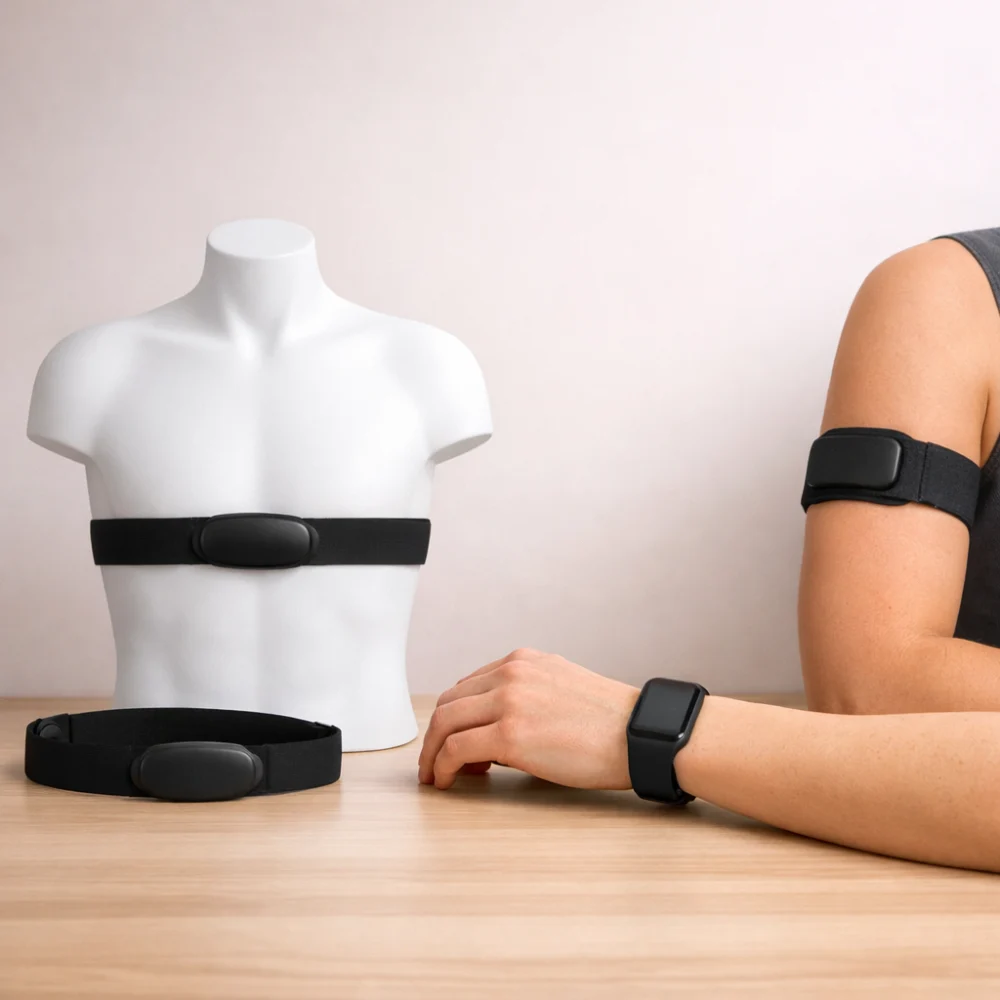
A chest strap places its sensor around the torso and may appeal to people who prefer a dedicated sensor rather than wearing a wrist device. The trade-off is that some people find a chest strap less convenient or comfortable than a wrist or arm option. Check its adjustment, fastening and how it displays or sends readings.
Wrist-worn monitors
A wrist-worn monitor keeps the sensor on the wrist and may be convenient for people already accustomed to wearing a band or watch. Designs differ: some show readings on the device, while others rely on a paired screen. Check the display, fit and compatibility rather than assuming every wrist monitor includes the same functions.
Arm-worn monitors
An arm-worn sensor offers another placement for people who do not want a chest strap or wrist device. Consider whether its position and fastening suit your activity, and check how it connects to any equipment you plan to use. It may require a separate device to display readings.
The illustrations below show the broad placement differences; they do not represent specific models or guarantee particular features.
Choose for the way you will use it
- For viewing readings on the go: Prioritise a clear display if you want to check readings without reaching for a phone. Confirm what the screen actually shows.
- For use with existing equipment: Start with the equipment you intend to pair, then check its supported connections and the monitor’s compatibility information.
- For a less noticeable setup: Compare compact sensors with models that include a screen or broader wearable design. Consider where each sits and whether you will need to carry a separate device.
- For activities involving water: Look for explicit information about the monitor’s water rating and intended use. Do not infer suitability from its appearance or from a general product label.
Common buying mistakes and misunderstandings
- Choosing by sensor style alone: A familiar-looking design may not work with your equipment. Check fit, display and connection details as well.
- Assuming pairing is universal: Connection support differs. Verify compatibility with the exact phone, watch or equipment you plan to use.
- Expecting every model to include a screen: Some monitors rely on another device to display readings. Confirm where you will see the information before buying.
- Treating readings as medical measurements: Consumer monitor readings are estimates and should not be used to diagnose a condition. Choose according to your intended use and seek professional guidance if readings affect a health decision.
- Assuming water suitability: Models differ in their stated ratings and intended use. Check the product information rather than relying on a general claim or appearance.
Safety and suitability
Heart rate monitors are consumer measuring devices, and their readings are estimates rather than a diagnosis or a substitute for medical equipment. If you need readings to inform a health decision, ask a healthcare professional which type of device is appropriate. Check any stated wearing and water-use guidance for the model you are considering.
Care, power and storage
Follow the manufacturer’s care information for the sensor, band or strap, as cleaning and water guidance can vary by model. Consider where you will store the monitor and its charging accessories, if applicable, and whether its power arrangements fit your routine. Check whether the product information describes replaceable parts or other ongoing requirements instead of assuming these are the same across designs.
A practical buying process
- Write down when and where you want to use the monitor, and whether you need to see readings during the activity.
- Choose a sensor position that seems practical for your comfort and intended use.
- Decide whether the monitor needs its own display or will pair with equipment you already use.
- Compare fit, connection support, power and any relevant water-use information.
- Check the specific product details, including what is included and any app or device requirements, before deciding.
Heart rate monitor buyer checklist
- Is the sensor position suitable for how I plan to use it?
- Will I be able to view readings where and when I need them?
- Is the monitor compatible with the phone, watch or equipment I intend to pair?
- Have I checked the fit, fastening and wearing guidance?
- Do the power arrangements and any app requirements suit my routine?
- Have I checked the stated water suitability if it matters for my activity?
- Am I treating readings as estimates, not as a medical diagnosis?
Frequently asked questions
Is a chest strap or wrist monitor better?
Neither style is the right choice for everyone. A chest strap and a wrist monitor differ in placement, comfort and how they may connect to other devices, so compare the fit and features against your intended use.
Can a heart rate monitor connect to my phone or watch?
Some monitors connect to phones, watches or other equipment, but supported connections and compatibility vary. Check the product details against the exact device you plan to use.
Do heart rate monitors need a phone?
Not necessarily. Some monitors display readings themselves, while others rely on a paired device; some may offer different ways to view or record information. Check how the particular model works before buying.
Are heart rate monitor readings medically accurate?
Consumer heart rate monitor readings are estimates and are not a diagnosis. If you need information for a medical decision, ask a healthcare professional about an appropriate device.
Can I use a heart rate monitor in water?
That depends on the model and its stated water rating and intended use. Check the manufacturer’s information for the specific product, and do not assume that every monitor is suitable for swimming or other water activities.
Do I need a separate heart rate monitor if I have a watch?
Some watches and fitness trackers measure heart rate, while a separate monitor may be used with a compatible device. Check what your existing device measures and displays, and whether it supports pairing with the type of monitor you are considering; these functions vary by model.