


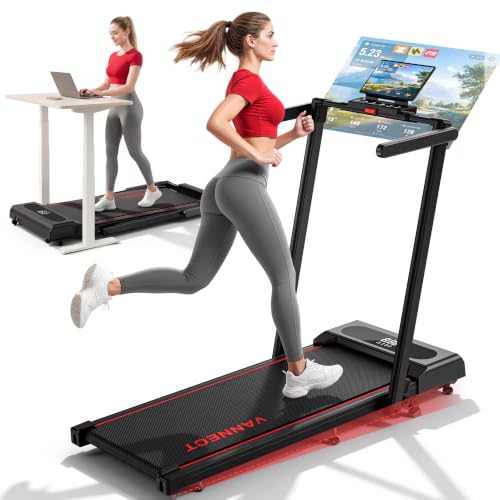


Quick Summary
The black Mobvoi Treadmill Ultra is a treadmill with walking, workstation and running modes. Its stated speed range is 1 to 6 km/h for walking and workstation use, and 1 to 12 km/h for running. It has a 6% incline configuration, a 102 x 42 cm running area and a stated maximum user weight of 120 kg.
The treadmill connects with the TicSports app and is described as compatible with Zwift and Kinomap via a separate device. Check app and device requirements, along with the space available for the treadmill, before choosing it.
Key Details
| Detail | Information and buyer relevance |
|---|---|
| Brand and model | Mobvoi Treadmill Ultra. |
| Modes and speed | Walking and workstation modes: 1 to 6 km/h. Running mode: 1 to 12 km/h. |
| Incline | A 6% incline configuration is stated. Check the manufacturer’s instructions for how to set it up. |
| Running area | 102 x 42 cm. Compare these dimensions with the space you want for walking or running. |
| Maximum user weight | 120 kg. |
| Motor rating | 2.5 HP is stated. |
| Dimensions and weight | 51.18 x 23.62 x 43.31 inches; 55.12 lb (approximately 25 kg). Allow for the stated dimensions when planning its position. |
| Apps and audio | TicSports app, Bluetooth speakers, and stated connection with Zwift and Kinomap via a separate device. Check app and device requirements. |
| Control hub | Includes a tray, cup holder and quick-access speed buttons for 3 and 6 km/h. The display is described as large enough to hold a laptop. |
| Warranty | A 2-year manufacturer warranty is stated. Check the applicable terms. |
What to Compare Before Buying
- Space: Compare the treadmill’s stated dimensions and 102 x 42 cm running area with your planned location. Check the manufacturer’s placement guidance for the setup you intend to use.
- Mode and speed: Consider whether the stated walking and workstation range of 1 to 6 km/h or running range of 1 to 12 km/h matches your intended use.
- App connection: Check the requirements for TicSports, Zwift or Kinomap and the device you plan to connect. Stated compatibility does not establish that every device or app feature will work.
- User weight: The stated maximum is 120 kg. Check this against the manufacturer’s limit for the exact model.
Key Features Explained
- Three modes: Walking, workstation and running modes have different stated speed ranges. The workstation range is 1 to 6 km/h.
- Incline configuration: A 6% incline is stated. Follow the manufacturer’s instructions for configuring it.
- Control hub: The tray, cup holder and quick-access buttons are located at the hub. Check that the arrangement works for your planned setup.
- Bluetooth speakers: Built-in speakers are listed. Check the connection method if you intend to use them.
Planning a Walking-Workstation Setup
Before using workstation mode, plan where the treadmill and your work equipment will be positioned, then compare the space available with the product dimensions. The control hub has a tray and cup holder, and the stated workstation speed range is 1 to 6 km/h. Follow the manufacturer’s instructions for positioning and operation.
Safe Use and Important Precautions
The stated maximum user weight is 120 kg. Read and follow the manufacturer’s instructions for assembly, incline configuration and operation before use.
Before You Decide
Check the available space, the speed range that matches your intended use and the 120 kg maximum user weight. If app connectivity matters, confirm requirements for your device and chosen app, and check the warranty terms.


Reviews
There are no reviews yet.